Home / Wet room record
Document the bathroom before the tiles go on
Once the tiles are on, nobody can see the membrane. After a leak, the insurer asks how it was done; when the house is sold, so does the buyer. CasaLog photographs the waterproofing step by step, while it can still be seen.
Download on the App StoreFree in the App Store for iPhone. Scanning needs an iPhone or iPad with LiDAR.
Seven steps, in the order of the work
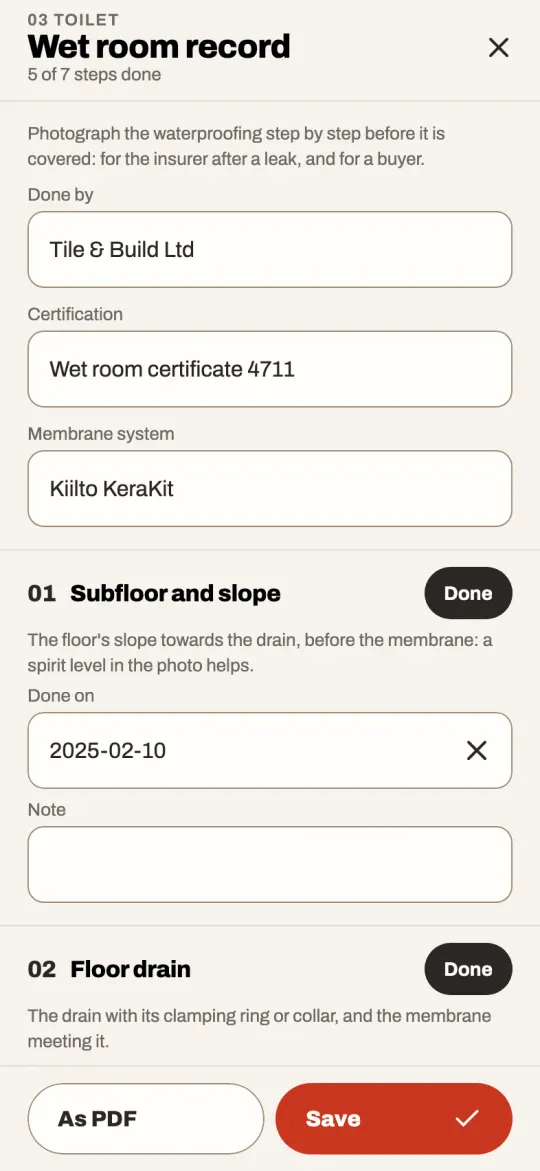
A bathroom, toilet, laundry, utility room or sauna offers Document the wet room on its screen. Each step is done or not, with a date, photos and a note, and says what its photo should show:
- subfloor and slope towards the drain
- the floor drain and how the membrane meets it
- pipes and cables through the membrane
- the membrane on the walls
- the membrane on the floor
- screws and plugs through the membrane
- finished: tiles or mat, grout and sealant
Who did it, and with what
Note the company or person who did the work, their certification and the membrane system. The record shows how far it has come, and the binder sums up each wet room.
As a PDF
Every step with its photos, and lines for whoever did the work and whoever ordered it to sign. It is a record of what was done, not a certificate: the requirements of the industry’s rules for wet rooms are not in the app, so follow them and your installer’s instructions. The PDF is part of CasaLog Home.
Do it yourself or have it done?
Both. A tradesperson can take the photos for you, or you take them as the work goes on. The record goes with the house when it is handed over.
More in CasaLog
- 01
Scan a floor plan
Walk through the rooms with an iPhone Pro and get the floor plan, every wall measured.
- 02
Decisions per wall and floor
The paint on wall B, the flooring, the tiles: each decision on the surface it is about, with photos and receipts.
- 03
The home’s binder
Warranties, invoices and manuals, read for you, with reminders. Or mail anything about the house to its own address.
- 04
Home inventory
Your things of value with photos, serial numbers and receipts, as a PDF for the insurer.
- 05
Quotes and calculations
What the work costs, from the rooms’ real measures and a price list: labour, material and the tins to buy.
- 06
Share with tradespeople
A read-only link with the plan, the measures and what you decided. No app needed to open it.
- 07
Ask the assistant
Questions answered with your own measures and decisions: how much paint, in what order, what to buy.
- 08
Hand over to the buyer
Sold the house? Give the buyer everything you kept about it, with one code.
- 09
Improvement costs (Sweden)
For a sale in Sweden: the improvements that lower the taxed gain, worked out from your invoices.
Start with one room
CasaLog is free to download, and everything about a home is free on one phone: scanning, the plan, decisions, documents, the inventory and the binder as a PDF. CasaLog Home, a subscription for the home, adds the household’s other phones, links for tradespeople, the home’s mail address, the other PDFs and more questions to the assistant. The first two weeks are free.
Download on the App Store