Home / Scan a floor plan
Scan a floor plan with your iPhone
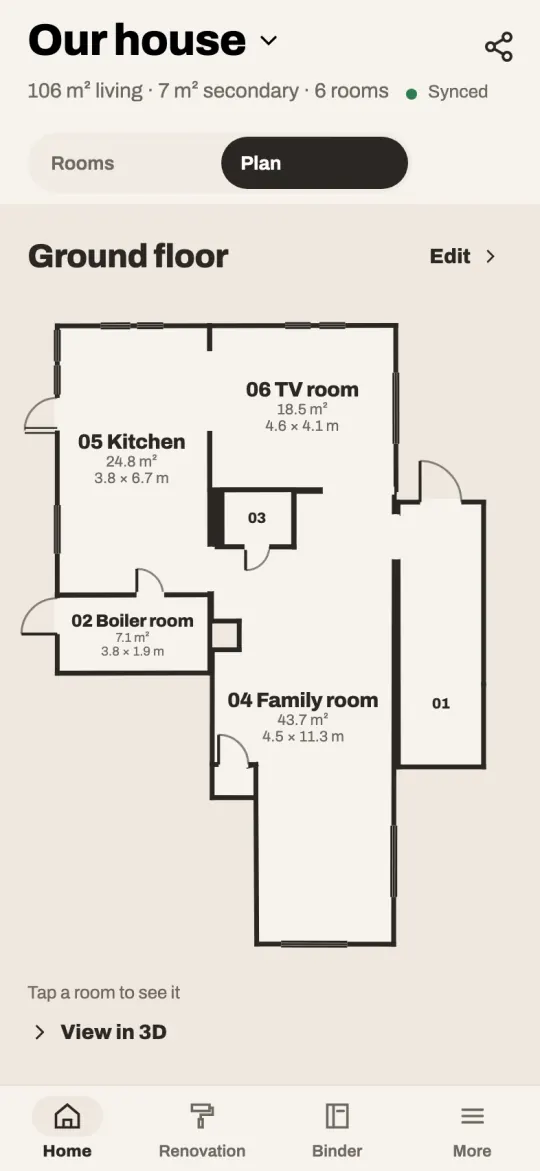
Walk slowly through a room with an iPhone Pro, pointing it at the walls. CasaLog measures every wall, door and window, works out the floor area, and adds the room to the home’s floor plan. One room or the whole house in one go.
Download on the App StoreFree in the App Store for iPhone. Scanning needs an iPhone or iPad with LiDAR.
How it works
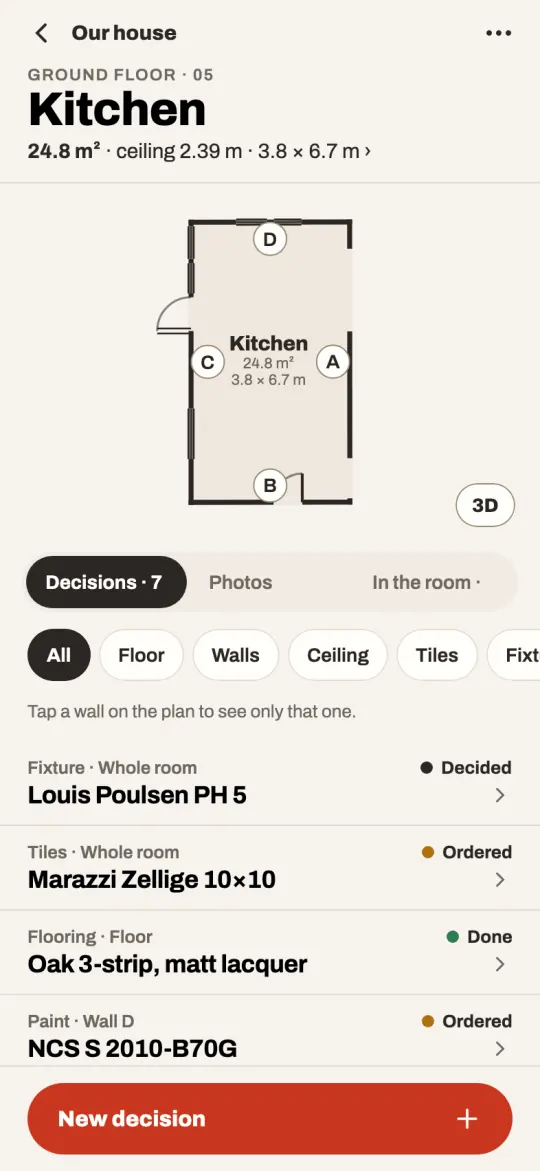
CasaLog uses the LiDAR sensor and Apple’s RoomPlan, which recognise walls, doors, windows and openings as you walk. When you are done, the room is drawn to scale with its walls lettered A, B, C and so on, so a decision can be about one wall.
- Every measure: each wall’s length to the centimetre, the ceiling height, the walls less doors and windows, the floor area, skirting and ceiling moulding.
- The floor plan: rooms are placed together floor by floor, numbered and named, with their areas.
- Furniture as scanned: beds, sofas, tables, storage, toilets and sinks come along where they stood, as a layout you can move about to plan the room.
- Put right by hand: a wall, door or window the scanner got wrong takes the length you measured.
Which phones can scan
Scanning needs an iPhone or iPad with LiDAR: the iPhone 12 Pro and later Pro models, and the iPad Pro. Without one, someone with an iPhone Pro can scan a room for you through an invite: they scan, and the room arrives in your home. They don’t need a home of their own in CasaLog.
What you get out of it
- The floor plan to print, to scale (1:50, 1:100 or 1:200), with every wall’s length.
- A floor plan for a listing: each room’s name and area, as an estate agent puts it.
- The measurements room by room, as a PDF or a spreadsheet.
- Quantities worked out for you: litres of paint, square metres of flooring and tiles, metres of skirting.
- A living area and secondary area for the home, room by room.
How exact is it?
Close, but not to the millimetre: the areas from a scan are estimates. Use the figures to plan, compare quotes and buy about the right amount, and measure before you cut. A wall that came out wrong takes the length you measured.
Does it work on Android?
The scanner uses Apple’s RoomPlan, which exists only on iPhone and iPad.
More in CasaLog
- 01
Decisions per wall and floor
The paint on wall B, the flooring, the tiles: each decision on the surface it is about, with photos and receipts.
- 02
The home’s binder
Warranties, invoices and manuals, read for you, with reminders. Or mail anything about the house to its own address.
- 03
Home inventory
Your things of value with photos, serial numbers and receipts, as a PDF for the insurer.
- 04
Wet room record
Photograph the waterproofing step by step before the tiles go on, for the insurer and a buyer.
- 05
Quotes and calculations
What the work costs, from the rooms’ real measures and a price list: labour, material and the tins to buy.
- 06
Share with tradespeople
A read-only link with the plan, the measures and what you decided. No app needed to open it.
- 07
Ask the assistant
Questions answered with your own measures and decisions: how much paint, in what order, what to buy.
- 08
Hand over to the buyer
Sold the house? Give the buyer everything you kept about it, with one code.
- 09
Improvement costs (Sweden)
For a sale in Sweden: the improvements that lower the taxed gain, worked out from your invoices.
Start with one room
CasaLog is free to download, and everything about a home is free on one phone: scanning, the plan, decisions, documents, the inventory and the binder as a PDF. CasaLog Home, a subscription for the home, adds the household’s other phones, links for tradespeople, the home’s mail address, the other PDFs and more questions to the assistant. The first two weeks are free.
Download on the App Store